
Your AI assistant could already create endpoints, deploy apps and read traffic through the ngris MCP server. Your databases and the hooks that start deploys still meant a trip to the dashboard.
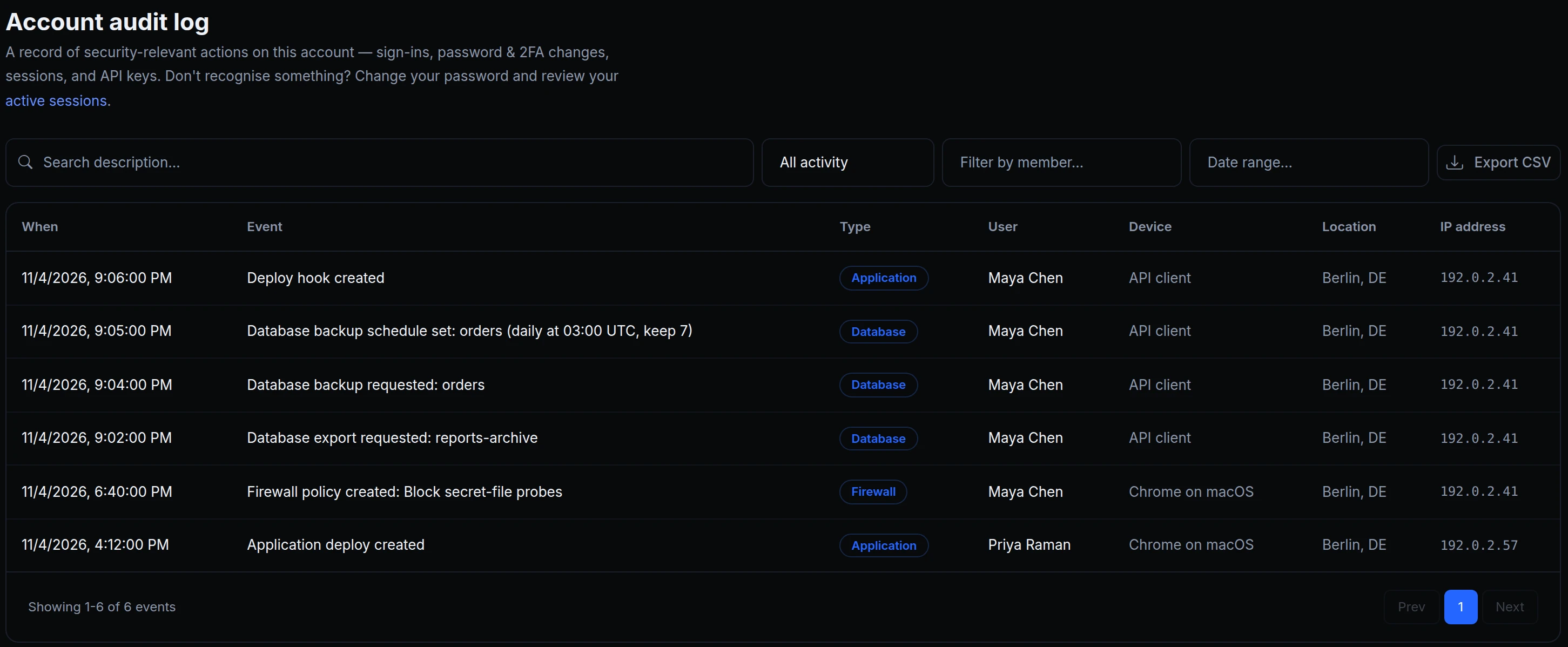
New tools cover both. Connect the MCP server to your assistant and ask in plain words, for example: "Back up the orders database now, make sure it's backed up every day at 03:00 UTC and kept for a week, export the old reports-archive, and give the docs site a deploy hook for our CMS." Above is Acme Labs' audit log right after Maya asked exactly that: every change, under her name, from an API client.


What your assistant can do now
- Databases. List, create, rename and delete managed databases, add users and give them new passwords, and connect a database to an app. A new password is shown once.
- Backups. Back up now, list backups, restore one, delete one, and set the automatic schedule. A restore replaces the database's data, so your assistant names the backup and the apps it affects, and asks you first.
- Exports. Export a paused database whenever you need its data.
- Downloads. Fetch a small backup or export through the assistant; larger files download from the dashboard.
- Deploy hooks. List an app's hooks, add one, give one a new URL, or delete it. A new URL is shown once.
- Functions. Create function apps on the Node.js 24 runtime, and write and attach edge functions.
- Your role, your log. The assistant acts as you, with your role, and every change it makes is in the account's audit log.
Get started
- Connect the ngris MCP server to your assistant: Connect.
- Ask, for example: "List my databases and their backups."
- Check what it did under Account → Audit Log.
- Read the docs: MCP server and database backups.