

A function with nothing to do scales to zero and starts again on its next request. When a crowd arrived while it was starting, some of those visitors could get an error page instead of an answer, and a function at its concurrency limit answered the next request with an error.
Two things changed. Functions run on Node.js 24, and a request that reaches a function while it wakes up, or while it's busy, now waits its turn at the edge.

What changed
- Node.js 24. Functions run on Node.js 24 LTS, the default runtime. A function created with
nodejs20ornodejs22runs on Node.js 24 as well. - Waking on demand. A sleeping function wakes on its next request. Every request that arrives while it starts waits for that same wake, then goes through.
- A busy function. Past its Max concurrency, a request waits for a free slot instead of getting an error page.
- Visitors who leave. A request whose visitor closes the connection drops out of the line, and the wake goes on for everyone else.
- Still bounded. If the function stays busy, or more requests arrive than the edge can hold for it, a request gets an error page that tells the client to retry.
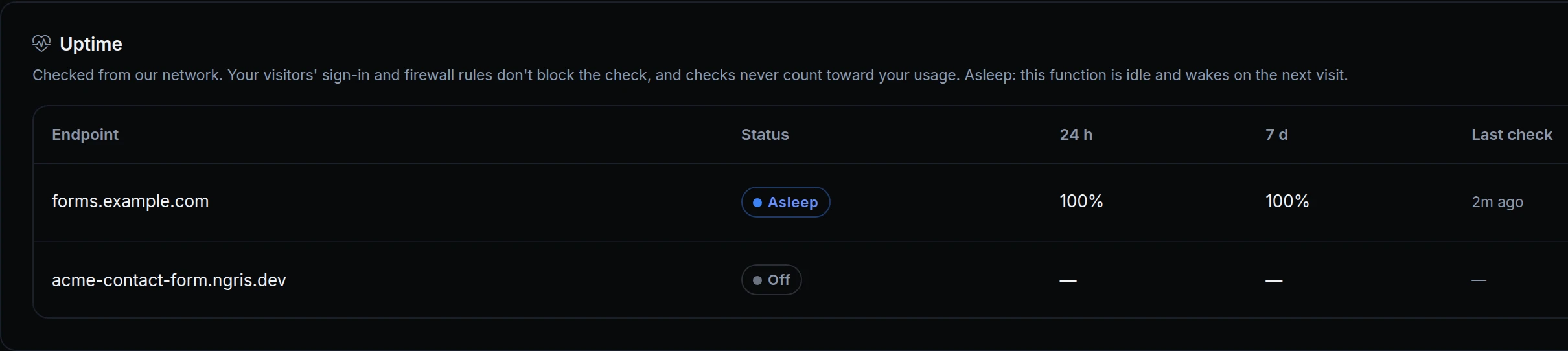
- Checks don't wake it. An uptime check of a sleeping function shows Asleep and leaves it asleep.
Get started
- In the dashboard, go to Gateway → Applications, open your function and its Function tab to see its runtime.
- On the Settings tab, set Max concurrency, and Idle time (0 keeps the function awake), then click Save settings.
- Turn on health checks for its endpoint to see Asleep or Up in the Uptime card on the Overview tab.
- Read the docs: Serverless functions and Runtimes.