
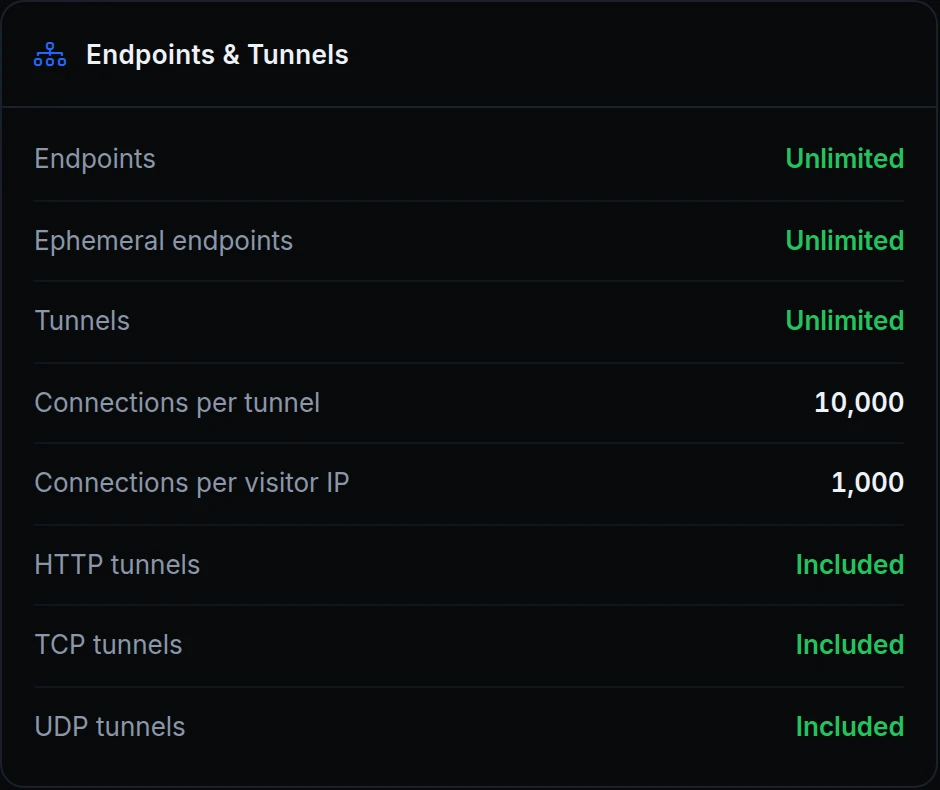
Connections used to be counted for the whole account. One client that kept opening connections and holding them open could fill them all, and every other visitor, on every tunnel of the account, got an error until it let go.
Now each tunnel has two caps, listed under Endpoints & Tunnels on Usage & Limits, as above. Connections per tunnel covers all of a tunnel's visitors together, and Connections per visitor IP is one address's share of that. By default the per-IP cap is a fraction of the per-tunnel one, so no single address can hold all of a tunnel's connections. And since each tunnel counts its own connections, one busy tunnel doesn't use up another's.
Say a scanner on 198.51.100.23 starts opening connection after connection to Acme Labs' office-db tunnel. Once it reaches its own cap, its new connections are refused, while the team's database clients keep connecting.
How it works
- Every kind of tunnel. HTTP, TCP and UDP connections all count.
- Past the cap. A new HTTP connection gets a 429 and is closed, a TCP connection is closed, and a UDP datagram is dropped. Connections already open carry on.
- UDP sessions. A session that never got an answer back can make room for a new one. A session in a two-way exchange is never dropped.
- The visitor's own address. The cap goes by the address a connection comes from, never by a header a client sends. Visitors behind one shared address, such as an office network or a CDN in front of your tunnel, share that address's cap, and support can raise it for your account.
- Tunnels only. The caps apply to the tunnels your agents run. Apps you deploy on ngris aren't counted.
Get started
- In the dashboard, go to Account → Usage & Limits and open the Plan capabilities tab.
- Find Connections per tunnel and Connections per visitor IP under Endpoints & Tunnels.
- If your visitors reach a tunnel through one shared address, ask support to raise the per-IP cap for your account.
- Read the docs: Connections per visitor IP in the API.